

Download PeaZip – Free, Secure File Compression & Encryption Tool
Overview
PeaZip is a powerful, open‑source file compression and encryption utility that works on Windows, macOS, Linux, Android, and iOS. Designed for both casual users and IT professionals, PeaZip supports more than 200 archive formats, including the ubiquitous ZIP, 7Z, RAR, TAR, and newer high‑efficiency containers such as Brotli and Zstandard. The application integrates the proven algorithms from 7‑Zip, p7zip, FreeArc, PAQ, and others, delivering fast compression without sacrificing data integrity.
Beyond simple archiving, PeaZip offers a full‑featured file manager with drag‑and‑drop, batch processing, and a built‑in secure password manager. Its encryption suite combines industry‑standard AES‑256, Twofish, and Serpent, letting you protect sensitive documents with multiple layers of security. Two‑step authentication and secure file deletion further harden your workflow, making PeaZip a trustworthy companion for confidential business files, personal backups, or software distribution.
Because it is released under a permissive open‑source license, PeaZip receives regular updates from a global community of contributors, ensuring compatibility with the latest operating‑system releases and emerging archive standards. Whether you need to compress a 10 GB video for email, extract a legacy LHA archive, or encrypt a collection of financial statements, PeaZip delivers a lightweight yet feature‑rich experience without hidden fees or invasive ads.
Key Features
- Support for over 200 archive formats (ZIP, 7Z, RAR, TAR, ISO, ARJ, LZH, etc.)
- High‑performance compression engines: 7‑Zip, Brotli, Zstandard, FreeArc
- Strong encryption options: AES‑256, Twofish, Serpent, and PEA‑based schemes
- Integrated password manager with two‑step authentication
- Secure file deletion (wipe) to prevent data recovery
- Cross‑platform availability: Windows 10/11, macOS 10.13+, Linux, Android, iOS
- Batch processing for multi‑file operations and command‑line support
- Context‑menu integration in Windows Explorer and macOS Finder
- Portable version that runs from USB without installation
- Customizable interface with themes, toolbar shortcuts, and file‑preview pane
Each feature is crafted to keep the user experience intuitive while delivering enterprise‑grade security. For example, the “Encrypt archive” wizard guides you through selecting an encryption algorithm, setting a strong passphrase, and optionally generating a unique PEA key file that can be stored separately. The built‑in checksum verification automatically checks the integrity of extracted files, alerting you to any corruption before you open the data. PeaZip also supports “split archives,” allowing you to break large archives into smaller, manageable chunks—handy for moving files across media with size limits. The application’s open‑source nature means you can audit the code, request new format support, or even contribute patches, ensuring that PeaZip stays aligned with the evolving needs of the compression community.
Installation & Usage Instructions
Getting started with PeaZip is straightforward. Visit the official website, click the “Download” button for your operating system, and choose either the installer (recommended for Windows/macOS) or the portable zip archive (ideal for USB drives). The installer guides you through standard steps: accept the license, select the destination folder, and optionally enable context‑menu integration. On Linux, you can install PeaZip via the Snap Store (snap install peazip) or by adding the official PPA (sudo add‑apt‑repository ppa:peazip/peazip && sudo apt‑update && sudo apt‑install peazip). Mobile users can download the Android APK from the Play Store or the iOS app from the App Store; both versions sync with the desktop client through cloud‑based password vaults.
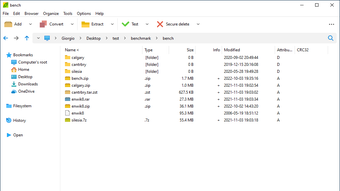
Once installed, launch PeaZip and you’ll be greeted by a dual‑pane file manager. To compress files, select one or more items, right‑click, and choose “Add to archive.” In the dialog, pick your desired format, set the compression level (Fast, Normal, Ultra), and enable encryption if needed. For extraction, simply double‑click an archive or drag it onto the PeaZip window; the program automatically detects the format and offers a preview of the contents before extraction.
Advanced users can access the command‑line interface by opening a terminal and typing peazip -add -ext=7z -password=MySecret file1.txt file2.doc for quick batch jobs. The secure delete feature is accessed via the “Wipe” option in the right‑click menu, allowing you to overwrite files with random data before they are removed from the disk. PeaZip also includes a “Benchmark” tool under the “Tools” menu, letting you compare compression speeds across algorithms on your hardware.
Compatibility: Windows 10/11, Windows Server 2016+, macOS 10.13+, Linux (Ubuntu, Fedora, Debian, openSUSE), Android 6.0+, iOS 12+.
Conclusion, Pros & Cons, and Frequently Asked Questions
Pros
- Free and open‑source – no hidden fees or trial limitations.
- Extensive format support eliminates the need for multiple utilities.
- Robust encryption suite meets corporate security standards.
- Cross‑platform consistency for teams using mixed OS environments.
- Portable version enables on‑the‑go usage without admin rights.
Cons
- Interface, while functional, may feel dated compared with commercial rivals.
- Some advanced features (e.g., multi‑volume splitting) require a learning curve.
- Occasional UI lag when handling extremely large archives on low‑end hardware.
Frequently Asked Questions
Is PeaZip truly free or does it have hidden costs?
PeaZip is released under the GNU Lesser General Public License (LGPL), which means it is completely free to download, use, and redistribute. There are no hidden premium features or subscription fees.
Can I encrypt archives with a password and still extract them on another computer?
Yes. PeaZip uses standard encryption algorithms (AES‑256, Twofish, Serpent) that are compatible across all supported platforms. As long as you provide the correct password (or key file), any PeaZip installation can decrypt the archive.
How does PeaZip’s secure delete differ from a normal file deletion?
Secure delete overwrites the file’s physical sectors with random data multiple times before removing the directory entry. This process makes data recovery virtually impossible, unlike a standard delete that only removes the reference.
Is there a portable version for users without admin rights?
Absolutely. PeaZip provides a portable zip package that runs directly from a USB stick or any folder without installation, making it ideal for restricted environments.
What is the recommended way to update PeaZip on Linux?
On most distributions, PeaZip can be updated via the package manager (e.g., sudo apt‑upgrade peazip for Debian‑based systems). If you installed via Snap, use sudo snap refresh peazip. The application also checks for updates on launch and prompts you to download the latest version.
In summary, PeaZip delivers a rare combination of breadth (200+ formats), depth (AES‑256, Twofish, Serpent encryption), and cross‑platform availability—all without charging a dime. Its open‑source nature guarantees transparency, while the built‑in file manager, secure deletion, and password vault make it a full‑featured security‑first utility. Whether you are a home user compressing photos, a freelancer sending large design assets, or an IT department standardizing on a free archiving solution, PeaZip is ready to download, install, and protect your data instantly. Ready to experience fast, secure compression? Click the download button below and start managing your files with confidence today.







